How To Auto Follow Accounts on Bluesky with FollowBlue: A Complete Guide

Growing your audience on Bluesky doesn't have to mean spending hours manually finding and following relevant accounts. FollowBlue's auto-follow feature helps you build a targeted following efficiently while you focus on creating great content.
In this guide, we'll walk you through exactly how to use FollowBlue's automated following features, including powerful filtering options that help you find your ideal audience.
What Is Auto-Following on Bluesky?
Auto-following is a growth strategy where you automatically follow accounts that match your criteria. The psychology is simple: when you follow someone, they get a notification, check out your profile, and often follow you back if your content resonates with them.
On Bluesky, this strategy is particularly effective because:
- The platform is still growing, so you face less competition for attention
- Notification visibility is high, meaning your follows get noticed
- The community is engaged, with higher follow-back rates than mature platforms
- Organic reach is better, so quality content gets seen
FollowBlue automates this process intelligently, helping you target the right accounts without spending hours on manual work.
Getting Started with FollowBlue
Before diving into filtering options, let's cover the basics of setting up your first auto-follow campaign.
Step 1: Connect Your Bluesky Account
First, you'll need to connect your Bluesky account to FollowBlue:
- Login with Bluesky to FollowBlue at followblue.app
- Grant FollowBlue permission to follow accounts on your behalf
Important: FollowBlue uses Bluesky's official API and follows all platform guidelines to keep your account safe.
Step 2: Explore the Discover Feature
Before setting up automation, use FollowBlue's Discover feature to research your target audience and find relevant profiles:
What Is Discover?
The Discover tool lets you search and browse Bluesky profiles by keywords, helping you identify the types of accounts you want to target with your auto-follow campaigns.
How to Use Discover:
- Navigate to the Discover page at app.followblue.app/discover
- Enter a keyword related to your niche in the search bar (e.g., "gaming," "startup founder," "fitness coach")
- Review the results - You'll see a list of profiles with their:
- Profile picture and display name
- Bluesky handle
- Bio/description showing why they matched your keyword
- Action buttons to visit or copy their profile
- Analyze the profiles to understand:
- What topics or industries they're interested in
- Their approximate follower ranges
- What keywords commonly appear in relevant profiles
- The type of content they post about
Real Example: Searching for Keywords in Discover
Here's what the Discover interface looks like when you search for profiles by keyword:
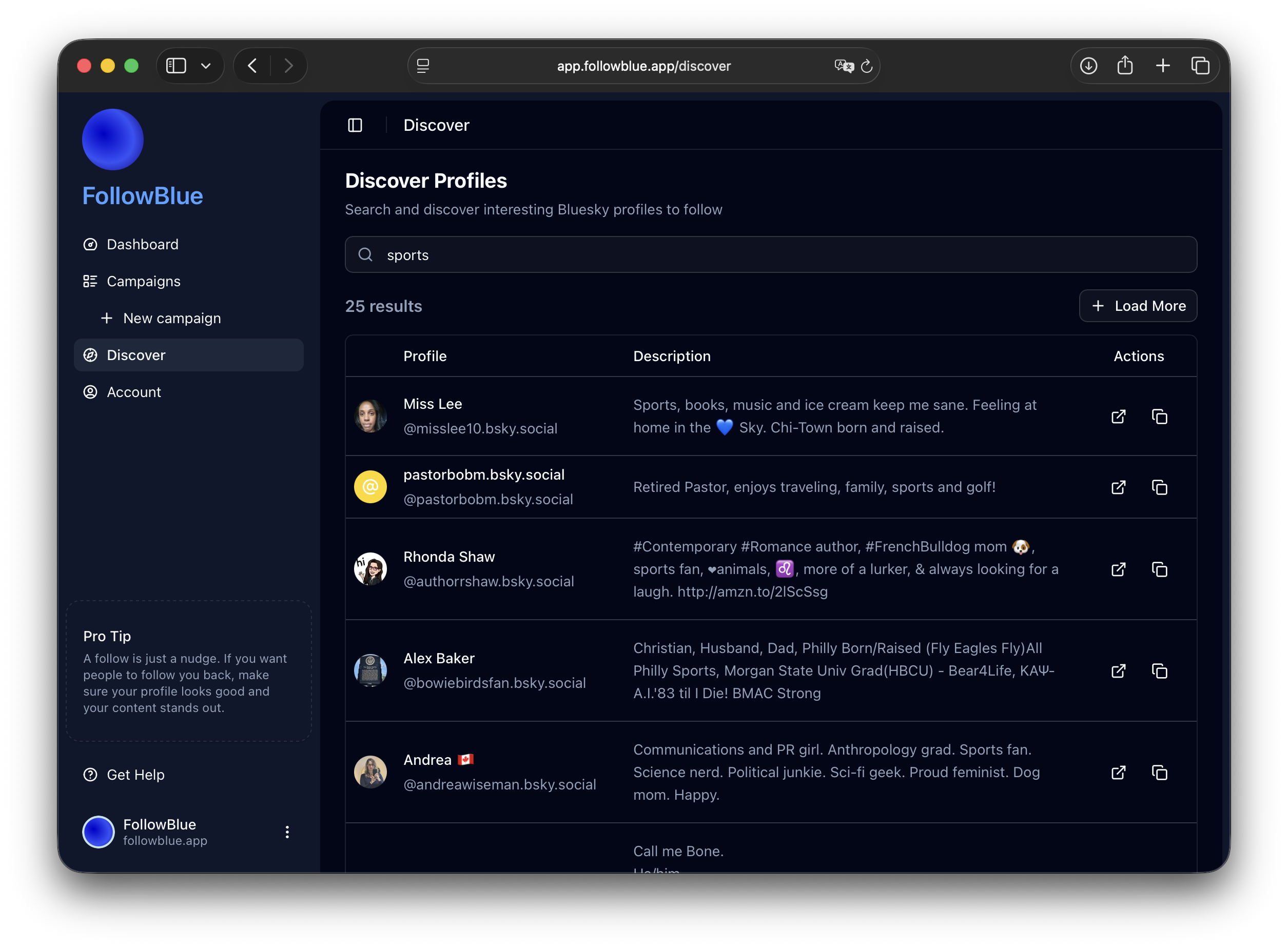
As you can see in the screenshot, the Discover tool shows you matching profiles with their display names, handles, and bio descriptions. This gives you an instant view of the types of accounts that match your keywords, helping you understand the diversity of your target audience and refine your keyword strategy before setting up automated campaigns.
Why Use Discover First?
- Validate your keywords before using them in campaigns
- Understand your audience by seeing real examples of profiles
- Find similar creators in your niche whose followers you can target in your campaigns
- Refine your targeting based on actual search results
- Discover new keyword ideas from profile descriptions
- See result counts to gauge how broad or narrow your keywords are
For example, if you search for a broad term like "gaming" or "sports," you'll quickly see the variety of profiles that mention these keywords. This helps you decide whether to use the broad term or narrow down to more specific keywords like "indie game dev," "retro gaming," "game streaming," or "basketball coaching" depending on which profiles best match your ideal audience.
Finding Similar Creators: One powerful strategy is to identify creators who are similar to you or slightly ahead of you in your niche. When you find accounts that create similar content or serve a similar audience, you can note their handles and later set up campaigns to auto-follow their followers. These followers are already interested in your type of content, making them highly likely to follow you back.
Pro Tip: Take notes on the most common keywords and phrases you see in profiles that match your ideal audience. These will become your campaign keywords in the next step. Also note the handles of 3-5 similar creators whose follower base you'd like to tap into.
Step 3: Define Your Target Audience
Now that you've explored profiles with Discover, crystallize your targeting strategy:
- What specific topics or industries are they interested in?
- What's their approximate follower range?
- What keywords consistently appear in their profiles or posts?
- Are there any negative keywords you should exclude?
Having this clarity makes your filtering much more effective when you set up your campaigns.
Filtering by Keywords: Finding Your Niche
One of FollowBlue's most powerful features is keyword filtering. This helps you find accounts that are genuinely interested in your niche.
How Keyword Filtering Works
FollowBlue scans user profiles and recent posts for keywords you specify. When it finds a match, it automatically follows that account based on your campaign settings.
Remember those keywords you discovered while using the Discover feature? Now it's time to put them to work in an automated campaign.
Setting Up Keyword Filters
Here's how to configure keyword filters effectively:
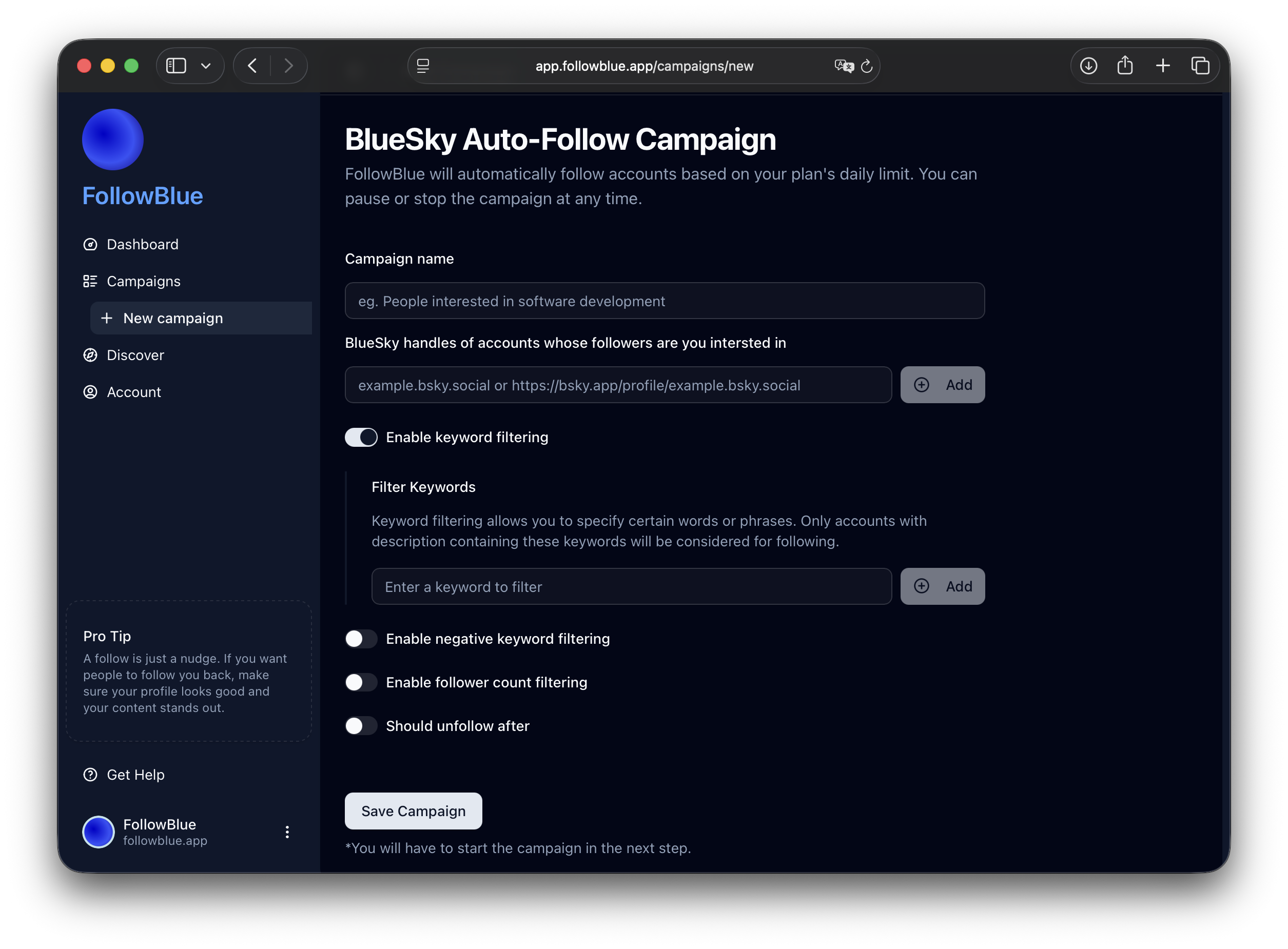
1. Access the Filter Settings
- Log into your FollowBlue dashboard
- Click "Create New Campaign" or edit an existing one
- Navigate to the "Keyword Filters" section
Here's what the campaign setup interface looks like:
2. Add Your Keywords
Enter keywords that represent your niche. Use the insights you gathered from the Discover feature to choose keywords that actually appear in your target audience's profiles.
For example:
For a Tech Startup:
- "SaaS"
- "startup founder"
- "entrepreneur"
- "product manager"
- "tech innovation"
For a Fitness Coach:
- "fitness"
- "workout"
- "nutrition"
- "health coach"
- "strength training"
For a Content Creator:
- "content marketing"
- "copywriting"
- "SEO"
- "digital marketing"
- "content strategy"
For a Gaming Creator/Streamer (based on Discover insights):
- "game streaming"
- "retro gaming"
- "indie games"
- "esports"
- "game developer"
Notice how these keywords are more specific than just "gaming." That's because when you searched "gaming" in Discover, you saw the diversity of gaming profiles and chose more targeted terms that match your specific gaming niche.
3. Use Negative Keywords to Refine Your Targeting
FollowBlue also lets you exclude accounts that mention certain terms, helping you avoid irrelevant profiles:
Negative Keywords: Exclude accounts that mention certain terms
- Example: If you're targeting "fitness" enthusiasts but want to avoid supplement sellers, add "supplements" as a negative keyword
- Example: Target "startup" founders but exclude "recruiting" or "hiring" posts
- Example: Follow "designers" but exclude "hiring designers" or "looking for designers"
This helps you focus on accounts that are genuinely relevant to your niche rather than accounts that just happen to mention your keywords in a different context.
Keyword Filtering Best Practices
Start Broad, Then Narrow
Begin with broader keywords to understand your audience, then refine based on results. Monitor your follow-back rates to see which keywords perform best.
Use Niche-Specific Language
Include industry jargon and terminology your ideal audience uses:
- Instead of just "tech," try "dev tools," "developer experience," or "API design"
- Instead of just "business," try "B2B SaaS," "revenue operations," or "growth marketing"
Monitor and Adjust
Check your analytics weekly:
- Which keywords bring the highest follow-back rates?
- Are you attracting engaged users or inactive accounts?
- Do you need to add negative keywords to filter out unwanted matches?
Don't Overstuff Keywords
Quality over quantity. 5-10 well-chosen keywords typically work better than 50 generic ones.
Filtering by Follower Count: Finding Your Audience Sweet Spot
Follower count filtering helps you target accounts that match your growth stage and engagement goals.
Why Follower Count Matters
Different follower ranges have different characteristics:
1-500 Followers (Micro Accounts)
- Pros: Higher follow-back rates (40-50%), more personal engagement
- Cons: Smaller reach, still building credibility
- Best for: Early-stage accounts building initial community
500-5,000 Followers (Growing Accounts)
- Pros: Good follow-back rates (25-35%), engaged communities
- Cons: Moderate reach, still establishing themselves
- Best for: Most growth campaigns seeking quality connections
5,000-50,000 Followers (Established Accounts)
- Pros: Strong reach, industry credibility, potential partnerships
- Cons: Lower follow-back rates (10-20%), may not notice your follow
- Best for: Networking and visibility campaigns
50,000+ Followers (Influencers/Brands)
- Pros: Massive reach if they engage with you
- Cons: Very low follow-back rates (<5%), unlikely to notice
- Best for: Strategic follows for visibility, not expecting follow-backs
Setting Up Follower Count Filters
Here's how to configure follower count filtering in FollowBlue:
1. Navigate to Follower Filters
- Go to your campaign settings
- Find the "Follower Count Filter" section
2. Set Your Range
Define minimum and maximum follower counts:
Example Settings:
For Maximum Follow-Backs:
- Minimum: 100 followers
- Maximum: 2,000 followers
- Why: Active accounts that still respond to new follows
For Industry Networking:
- Minimum: 1,000 followers
- Maximum: 10,000 followers
- Why: Established voices in your niche with decent reach
For Brand Visibility:
- Minimum: 5,000 followers
- Maximum: No limit
- Why: Getting on the radar of influencers and thought leaders
3. Combine with Other Filters
The real magic happens when you combine follower count with keyword filters:
Example 1: Finding Engaged Micro-Influencers
- Keywords: "content creator," "YouTube," "video editing"
- Follower range: 500-5,000
- Result: Small but engaged creators in your niche
Example 2: Networking with Industry Peers
- Keywords: "product manager," "SaaS," "B2B"
- Follower range: 1,000-10,000
- Result: Established professionals at similar growth stages
Example 3: Building Initial Community
- Keywords: "yoga," "wellness," "mindfulness"
- Follower range: 50-1,000
- Result: Early adopters who actively follow back
Follower Count Strategy Tips
Match Your Growth Stage
If you have 500 followers, targeting accounts with 50,000+ won't be effective. Aim for accounts within 2-10x your current follower count for best results.
Test Different Ranges
Run multiple campaigns with different follower count ranges (requires Pro Plan for up to 3 campaigns):
- Campaign A: 100-1,000 (high follow-back rate)
- Campaign B: 1,000-5,000 (moderate follow-back, better reach)
- Campaign C: 5,000-20,000 (low follow-back, strategic visibility)
Track which ranges give you the best ROI in terms of follow-backs and engagement.
Adjust Based on Your Goals
If your goal is rapid follower growth: Focus on lower follower counts (100-2,000) where follow-back rates are highest.
If your goal is networking and partnerships: Target mid-range accounts (2,000-20,000) who have influence but are still accessible.
If your goal is brand awareness: Include higher follower counts (20,000+) even though follow-backs will be rare.
How FollowBlue's Automation Works
Understanding how the automation operates helps you set up campaigns that feel natural and avoid looking spammy.
The Smart Follow Algorithm
FollowBlue doesn't just blindly follow everyone who matches your filters. The system uses an intelligent, proprietary algorithm that:
- Follows accounts gradually throughout the day to mimic natural behavior
- Prioritizes quality over quantity by targeting active, engaged users
- Respects Bluesky's rate limits to keep your account safe
- Filters out bots and spam accounts automatically
Setting Your Automation Parameters
FollowBlue Plans
FollowBlue offers two plans to fit different growth goals:
Starter Plan
- 30 follows per day (1,000 per month)
- Perfect for individuals and small accounts starting their growth journey
- Steady, sustainable growth rate
- Best for: New accounts building their initial audience
Pro Plan
- 90 follows per day (3,000 per month)
- Run up to 3 campaigns simultaneously
- Faster growth with multiple targeting strategies
- Best for: Established accounts, businesses, and serious creators looking to scale
Both plans include FollowBlue's smart algorithm, negative keyword filtering, and automatic unfollow management to maintain a healthy follower ratio.
The Unfollow Strategy
FollowBlue also handles unfollowing accounts that don't follow back, keeping your ratio healthy:
How It Works:
- FollowBlue tracks everyone you follow through the system
- After a set period (typically 7-14 days), it checks if they followed back
- If not, it can automatically unfollow them
- This maintains a healthy following/follower ratio
Unfollow Settings:
- Wait period: How long to wait before unfollowing (7-30 days recommended)
- Keep follows: Option to keep following certain accounts regardless
- Unfollow pace: Gradual unfollowing to look natural
Best Practice: Always unfollow at a slower pace than you follow (e.g., with Pro Plan at 90 follows/day, unfollow max 60/day).
Safety and Rate Limits
FollowBlue is designed to keep your account safe:
Built-in Protections:
- Respects Bluesky's official rate limits
- Monitors your account health
- Pauses if unusual activity is detected
- Avoids patterns that trigger spam filters
Recommended Approach:
- Start with conservative settings
- Monitor your account's follow-back rate
- Gradually increase pace if results are good
- Slow down if you notice warning signs (low follow-backs, account restrictions)
Best Practices for Auto-Following Success
1. Optimize Your Profile First
Before starting any auto-follow campaign, make sure your profile is follow-back worthy:
Profile Checklist:
- ✅ Clear, professional profile picture
- ✅ Compelling bio that explains who you are and what you do
- ✅ Pinned post showcasing your best content
- ✅ At least 10-20 quality posts already published
- ✅ Custom domain handle (adds credibility)
People check your profile before deciding to follow back. Make it count.
2. Post Consistently During Campaigns
Auto-following brings people to your profile, but content keeps them there:
Posting Strategy:
- Aim for 1-3 quality posts per day
- Mix content types (insights, questions, threads, links)
- Engage with your new followers' content
- Respond to comments and mentions promptly
3. Monitor Your Analytics
FollowBlue provides analytics to track campaign performance:
Key Metrics to Watch:
- Follow-back rate: Percentage of followed accounts that follow back
- Engagement rate: Likes, replies, reposts from new followers
- Profile visits: How many people check your profile after you follow
- Unfollow rate: How many people unfollow you after initially following back
Healthy Benchmarks:
- Follow-back rate: 25-35%
- Engagement from new followers: 5-10%
- Unfollow rate: <20% within 30 days
4. Engage with Your New Followers
Automation gets their attention, but genuine engagement builds relationships:
Engagement Tactics:
- Like and comment on new followers' posts
- Repost valuable content from your followers
- Send welcome messages (manually, not automated)
- Participate in conversations in your niche
5. Adjust Based on Results
Review your campaigns weekly:
Questions to Ask:
- Which keyword filters produce the highest quality follows?
- What follower ranges give the best follow-back rates?
- Are your new followers actually engaged, or just numbers?
- Do you need to adjust your daily follow limits?
Make Adjustments:
- Pause underperforming campaigns
- Double down on what's working
- Refine keywords based on results
- Test new filter combinations
Getting Started Today
Ready to start growing your Bluesky audience with FollowBlue? Here's your action plan:
Week 1: Foundation
- Optimize your Bluesky profile (picture, bio, pinned post)
- Publish 10-15 quality posts to build your content library
- Login with Bluesky to FollowBlue
- Use the Discover feature to research your target audience (keywords, follower ranges)
Week 2: Launch
- Create your first campaign with the Starter Plan (30 follows/day)
- Set keyword filters for your primary niche
- Set follower count range (recommend 100-2,000 to start)
- Enable smart unfollowing (7-14 day wait period)
Week 3: Optimize
- Review your analytics (follow-back rate, engagement)
- Adjust keyword filters based on results
- Experiment with follower ranges if needed
- Consider upgrading to Pro if results are good and you want faster growth
Week 4: Scale
- Create additional campaigns for different niches (requires Pro Plan for multiple campaigns)
- A/B test different filtering strategies
- Focus on engaging with your new followers
- Document what's working for future campaigns
Conclusion: Smart Growth Through Automation
Auto-following on Bluesky isn't about gaming the system or building fake engagement. It's about efficiently connecting with your ideal audience so you can spend your time creating great content instead of manually hunting for accounts to follow.
FollowBlue's filtering options, particularly keyword and follower count filters, give you precise control over who you target. Combined with smart automation that respects platform guidelines and mimics natural behavior, you can build a genuine, engaged following without the manual grind.
Ready to grow your Bluesky presence?
FollowBlue helps you build a genuine following with smart, automated growth strategies that feel natural.
Get Started Today